Giving every new dataset a quality check from day one
Status: Built after I left the teamConfidential: Data has been anonymized
Overview
- Status
- In QA builds when I left in February 2025.
- My role
- Primary designer reporting to experience lead.
- Team
- Product manager, design lead, developers, product owners
- Users
- Data analysts, data engineers, developers, and other analysts
The company was building one platform to manage data across the enterprise. Datasets lived in different warehouses and lakes, in different formats, with no single place to track them. Data quality checks were a forgotten exercise in this process.
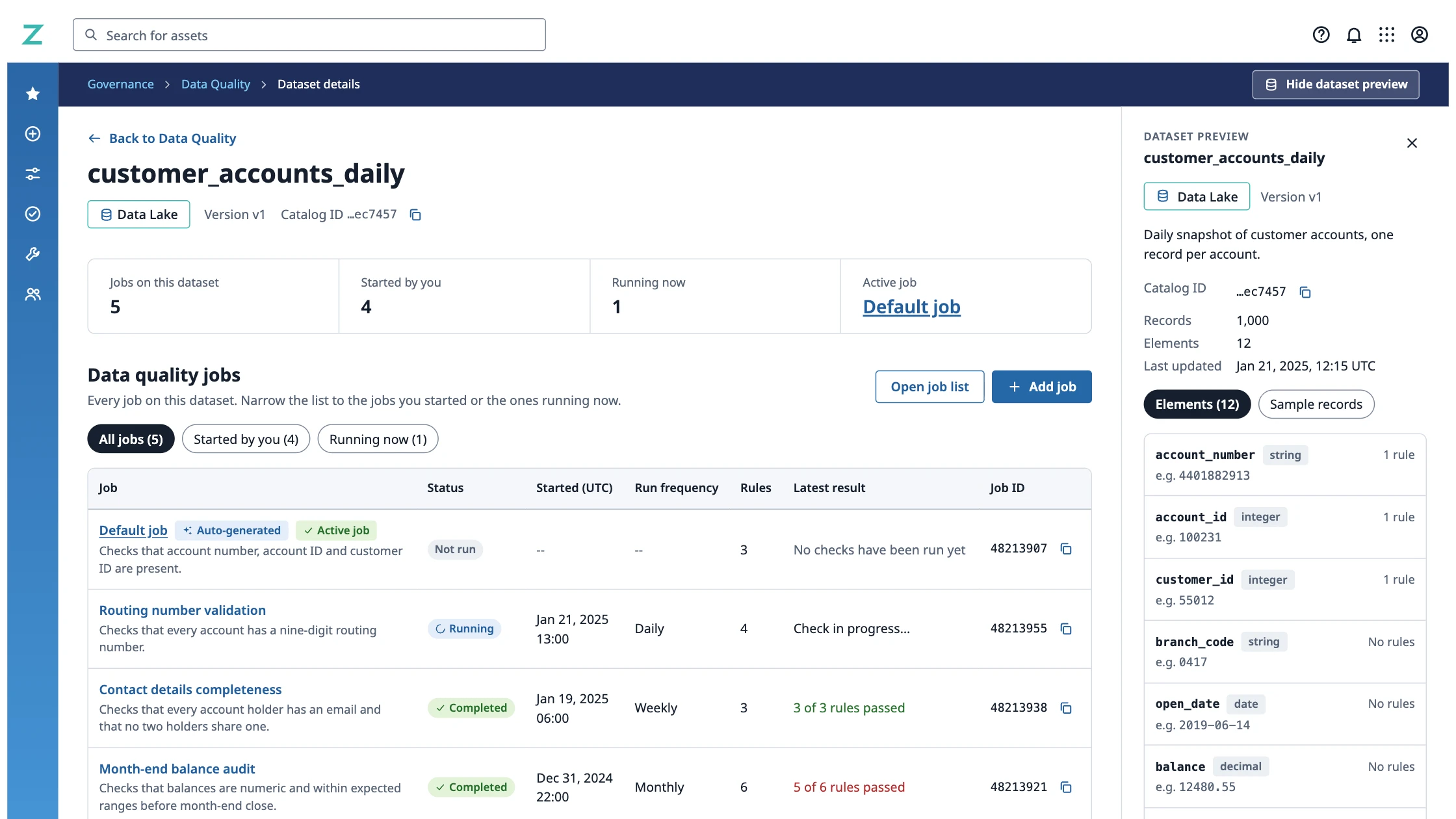
I designed how people create, run, and review quality checks on a dataset. The center of that work was the default job: a working set of checks the system creates as soon as someone finishes defining a dataset.
The problem
Skipping data quality checks sends unverified data to teams relying on it and inherit the cleanup.

Context
Quality checks usually happened late or not at all.
| Data lifecycle | Before | After |
|---|---|---|
| Schema complete | Not checked | Checked: Default job created Starter rules come from the schema |
| Data loaded | Not checked | Checked |
| Shared and used | In reports and other systems, unchecked | Checked |
| Later | Not checked: Checked late, or never Hand-written jobs or spreadsheets, if at all | Checked from day one Run it now or on a schedule |
Many data users did not know how to create a data quality job or knew about the implications of skipping them.
Model
The work rests on a small model with four parts.
- A dataset has one or more jobs.
- A job is a group of rules that run together, on demand or on a schedule.
- A rule checks one field against one condition, with a pass threshold.
- A run records what happened each time a rule was checked.
Each screen answers the question that belongs to its level.
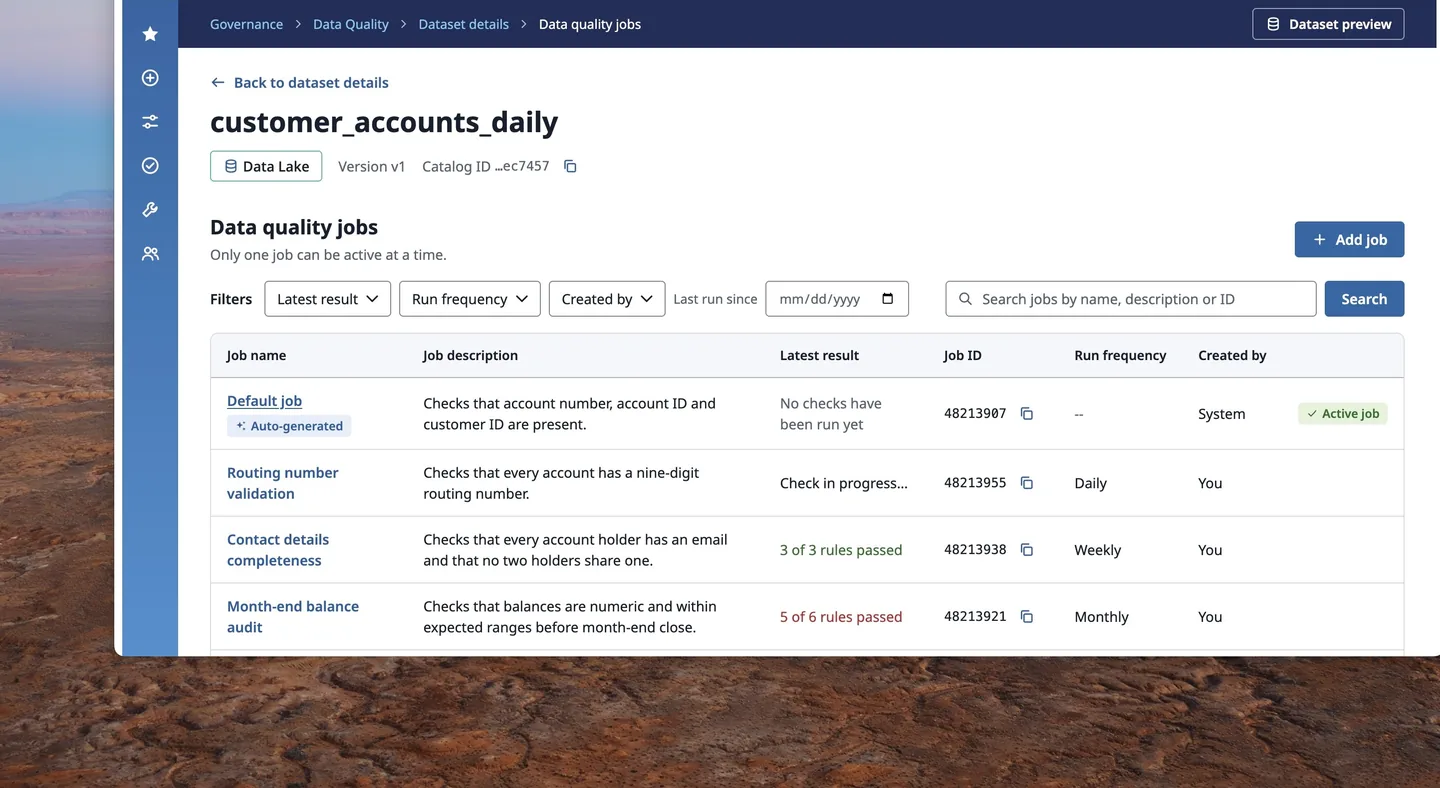
The dataset page shows which jobs exist and how they last did. The job page shows its rules and their latest results. Opening a rule shows its history.
How I got there
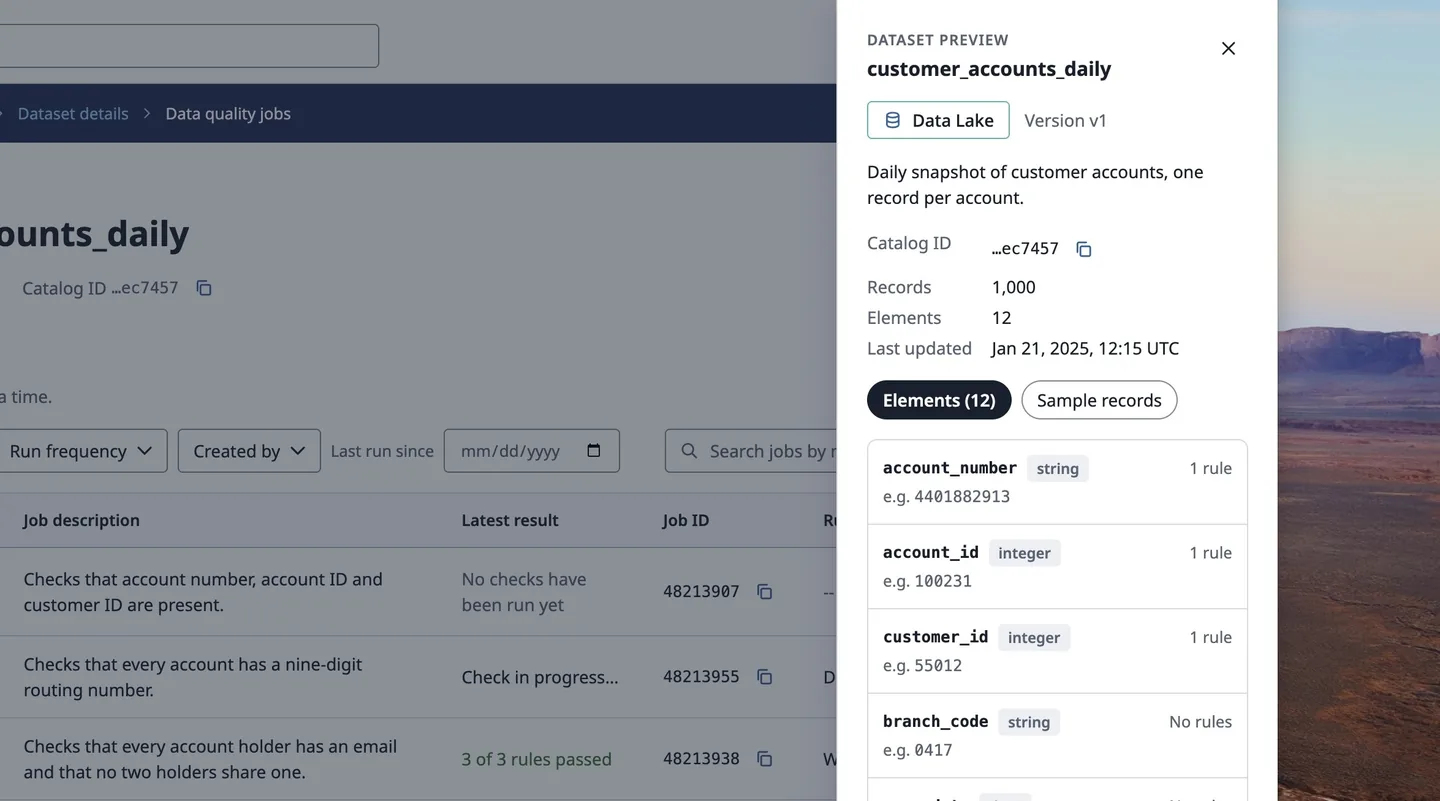
I reviewed the department’s documentation of the data process from beginning to end, studied how existing jobs worked and where they didn’t, and worked out how the existing tables and process could support a default job.
- Dataset
Has one or more jobs
Shown on
Dataset page
Which jobs exist and how they last did
- Quality job
A group of rules that run together, on demand or on a schedule. The default job is one of these.
Shown on
Job page
Its rules and their latest results
- Quality rule
Checks one field against one condition, with a pass threshold
Shown on
Rules table
One row per rule, on the job page
- Run record
Records what happened each time a rule was checked
Shown on
Run history
Opened from a rule; failed runs link to record samples
Problem
The question
How might we give someone who has never written a quality check a working one the moment their dataset exists, and still let them change it?
What I inherited
There was no single tool. Developers who knew how wrote quality jobs by hand, others tracked checks manually in spreadsheets, and many datasets weren’t checked at all.
I used existing design system components only. The one new pattern was the sparkle marker for auto-generated rules, created for this feature and not contributed back to the library.
Constraints
- The data quality team owned the quality process, so thresholds could be edited only after the schema was created.
- Engineering capacity for this new feature meant starter rules couldn’t be deletable in the first release.
Process
Decided with the team.
- ProductDesignRuleElementThreshold≥ 100%
Settled with the product manager and design lead
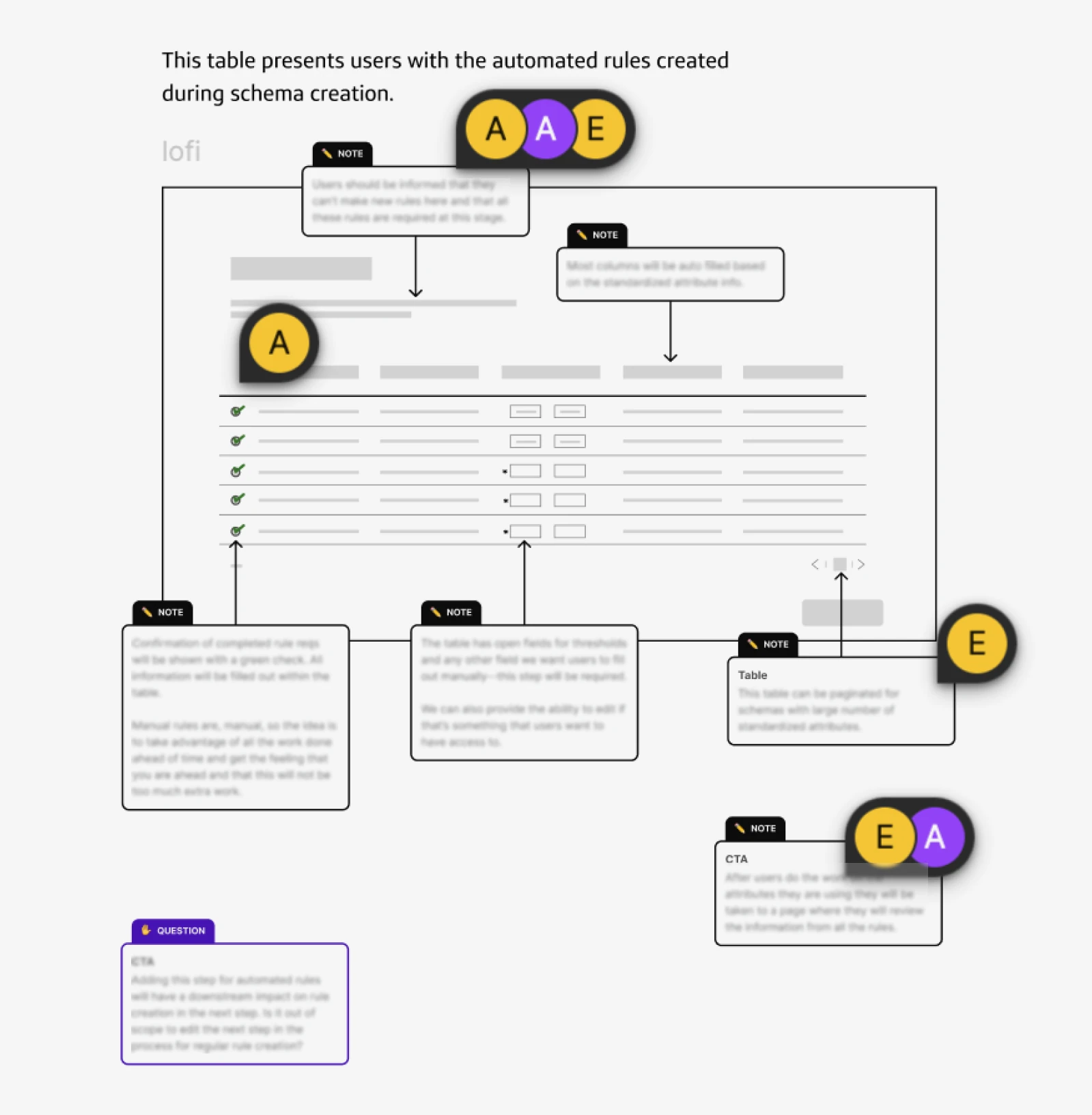
With the product manager and design lead, I settled what the rules table shows, its layout, and inline editing of rules.
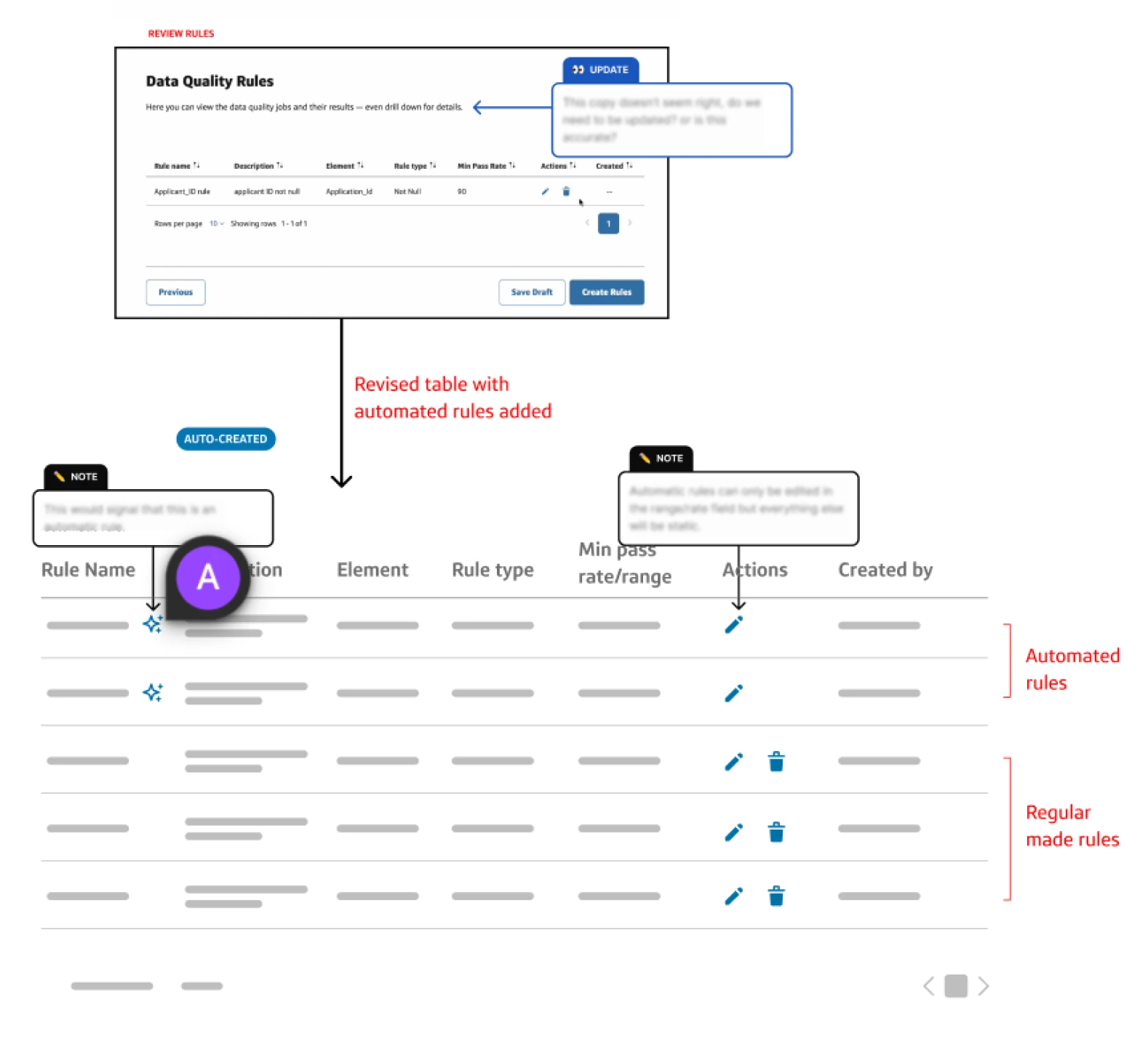
- ProductDesignEngineeringAuto-generatedCan't be deleted in the first release
Starter rules stay, for now
Product and engineering decided starter rules couldn't be deleted in the first release, for feasibility reasons. Product was open to making them deletable later, so I kept a path open to that.
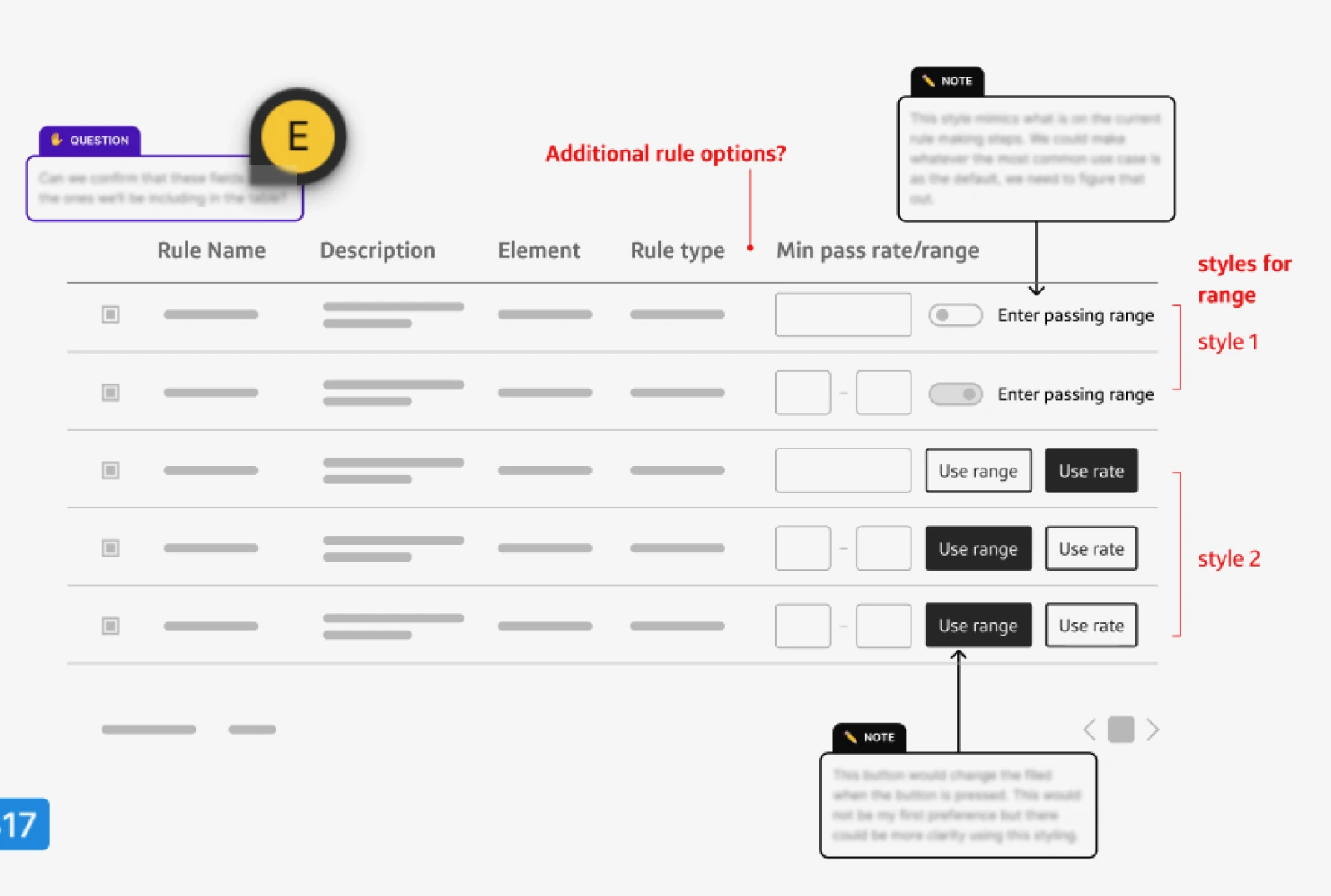
- ProductDesignEngineeringUsersStyle 1Enter passing rangeStyle 2Use rateUse range
Alternatives for the pass threshold
I explored two ways to set the pass threshold, a toggle and a two-option switch, and two kinds of threshold, a pass rate and a pass range. Users preferred pass rate as the default. The prototype recreates the control with the two-option switch, because it shows both options at once.
Ideation
Sketching a job no one has to build.
When someone finishes defining a schema, the system creates a default job with a starter set of rules. The person is told the job exists and can run it straight away.
Control
Automation people can see and change.
A job the system creates is only useful if people trust it.
The system's work is labeled.
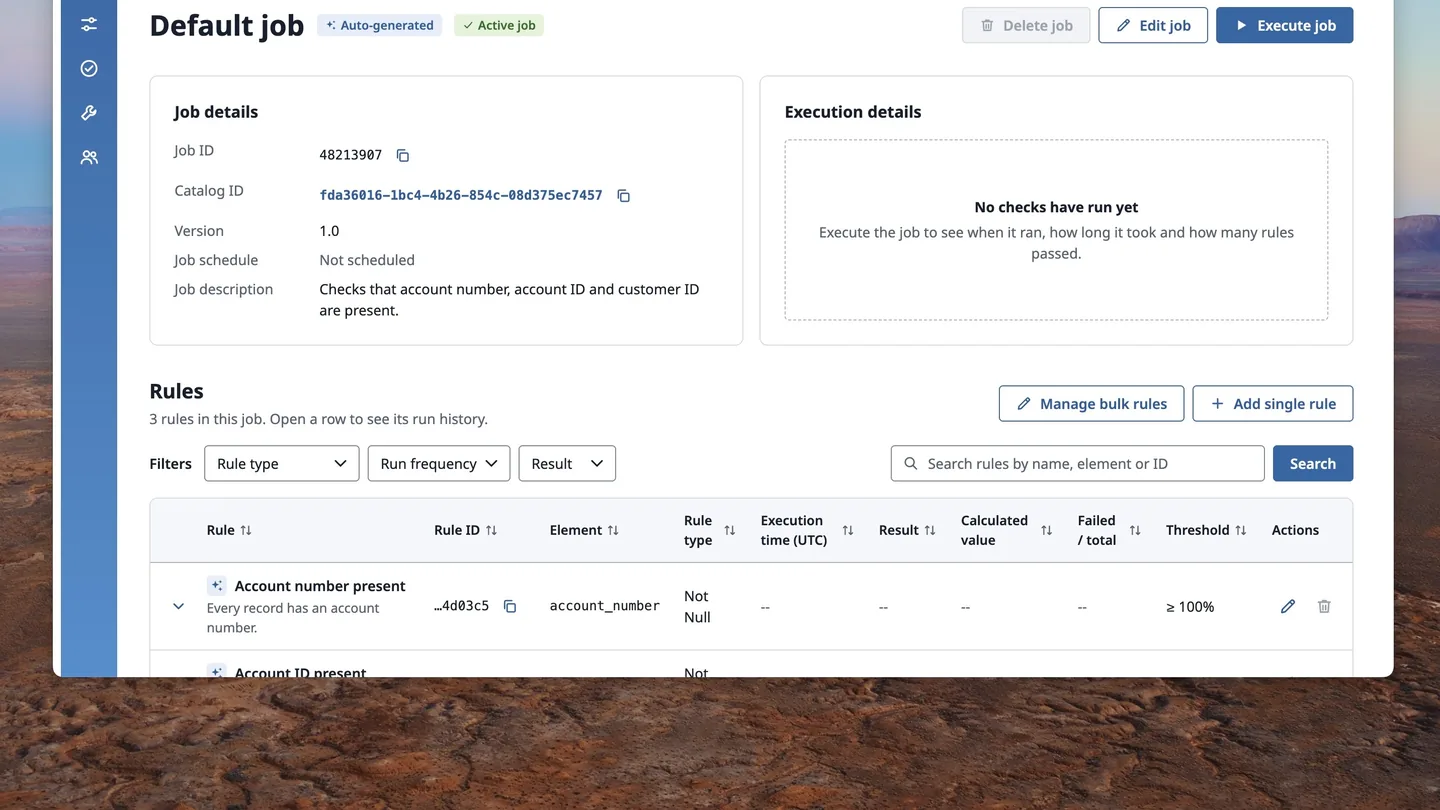
The default job and its rules are labeled “Auto‑generated,” so people can tell the system's work from their own. Checking now starts when the dataset does.
People stay in control.
They can edit a generated rule's threshold and schedule, add their own rules alongside it, and run the job whenever they want or on a schedule.
The starting point is protected.
Starter rules come from the data schema. Like the default job, they can't be deleted in the first release, so every dataset keeps a baseline check.
Failures
Looking into a failure.
Each rule shows its run history. When a run fails, the person can open sample values from the records that failed.
That was as far as the help went at the time. Stopping at failed-record samples was both an engineering limit and a scope call. A clearer path from failure to fix for people who are not data experts was the next step, and it had not been designed when I left.
Testing
What user testing showed and what I learned.
I ran usability testing with 7 people: data engineers, data analysts, and developers.
- People accepted a job made for them, and they wanted to be able to edit its rules.
- No one objected, many liked having one less thing to do, and some were delighted because it was new to them.
- A few said they might turn the job off later if it didn’t suit the way they work.
- The people who were neutral weren’t running quality checks yet, but understood why the bank wanted them to.
What I learned
This was the most technically complex project I’d worked on. It taught me to turn a manual, technical process into something people could see and use, even when they had little idea what it would look like.
Takeaways
A working default teaches better than a blank form.
People had real rules to read, run, and change, instead of an empty form to fill in.
People accepted automation because they could edit it.
In testing, no one objected to a job made for them, and people wanted to edit its rules.
Engineering feasibility shaped the first release.
Starter rules couldn't be deleted at first, so I kept a path open to making them deletable later.
What I would test next
Editing the whole job once it holds many rules and becomes complex. I’d also test how the same job works across different combinations of datasets, and how new rules could be tailored more closely to each dataset.